Tag: water

Navigate

  • ,

    The Puddler Script

    Worldpainter script that creates small rivers and ponds across the map

    Details

    downloads: https://github.com/IR0NSIGHT/Puddler/releases
    github: https://github.com/IR0NSIGHT/Puddler

    Worldpainter script that creates small rivers and ponds across the map

    downloads: https://github.com/IR0NSIGHT/Puddler/releases
    github: https://github.com/IR0NSIGHT/Puddler
    planetMc: https://www.planetminecraft.com/mod/puddler-js-worldpainter-script/

    1 1

    Instructions

    1. download the newest release as a zip file puddler.js file
    2. unpack the zip folder somewhere
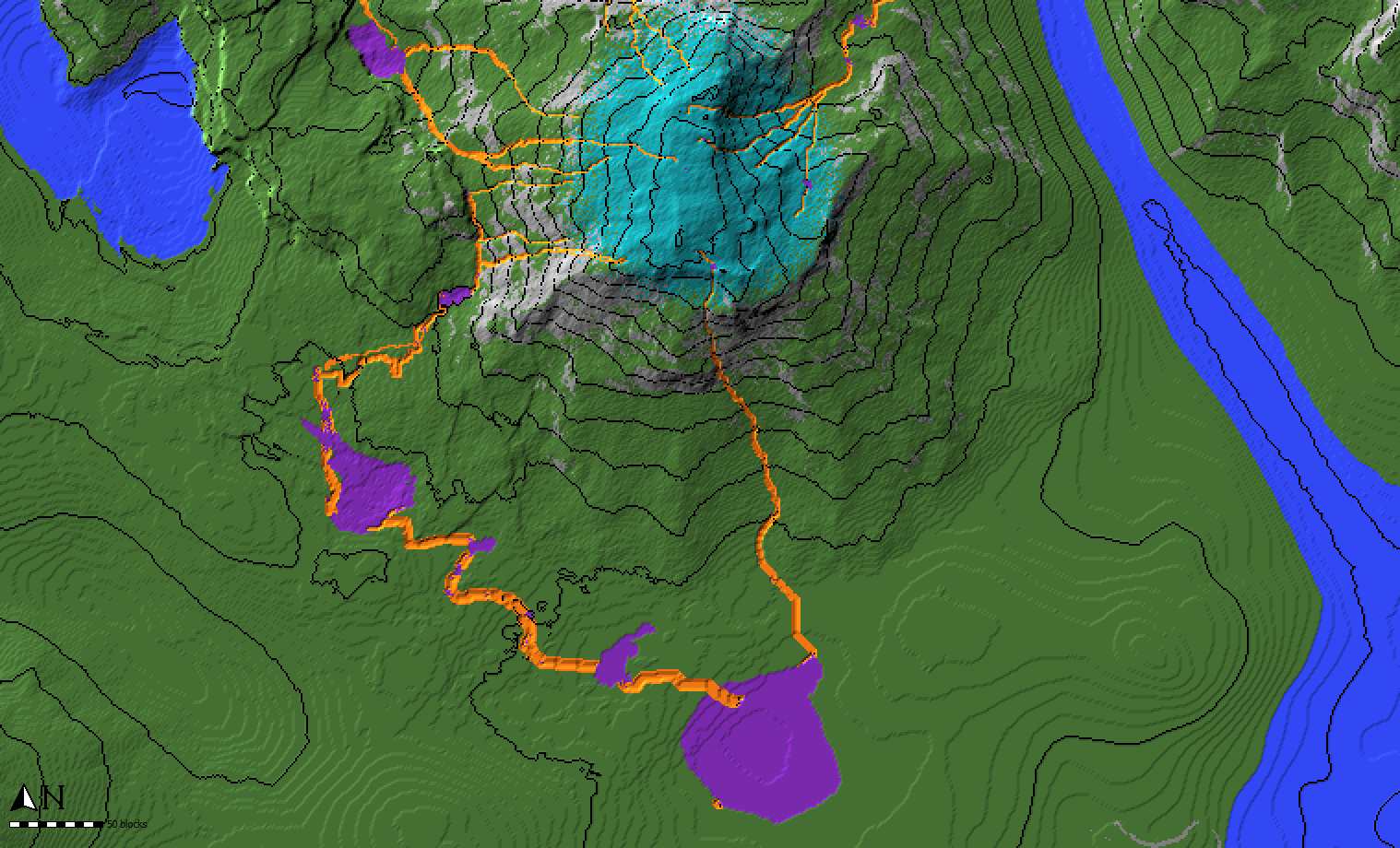
    3. mark all the spots where rivers can start in your worldpainter world with the CYAN annotation layer. Be generous, a 100×100 area is fine
    4. in WorldPainter, on the top toolbar, center-right, open “run script” and select Puddler.js from the folder where you unpacked the zip file
    5. Select your wanted parameters and run the script. Check “use Annotations” to get a preview of the rivers.
    6. Inspect if you like the rivers and puddles (lakes)
    7. Undo the script with ctrl + z
    8. Edit the terrain, to control where the water flows and where lakes form
    9. Repeat steps 5-8 until you are satisfied
    10. Run the script a final time with “flood Puddles” and “apply Rivers” checked to apply water
    11. Export the map to minecraft

    Example Video

    https://youtu.be/kUJXZ7FjP7Y

    Parameters

    • Max Puddle Surface: Lakes will stop growing if they reach this surface area and will not overflow and spawn new rivers. Smaller value: smaller lakes, rivers might not reach ocean
    • Minimal River Length: Dont apply rivers that are shorter than this
    • Spawn Probability: Chance for a river to spawn at a cyan annotated block.
      • 1000 = 1 block for 1000 cyan blocks will spawn a river.
      • 1 = 1 block for 1 cyan block will spawn a river
    • Flood Puddles: Puddles (Lakes) will be filled with water
    • Apply Rivers: Rivers will be filled with water
    • Apply as Annotations: Rivers and Puddles will be annotated in Orange and Purple
    • Ocean Water Leve: Rivers will stop once they reach this height. Should match your ocean level.
  • How do I add water properly to my map?

    Details
    1. For adding oceans, lower your terrain until it goes below groundwater. You can also use the flood tool to raise the water level or create lakes.
    2. Do not use “water” as a terrain, like stone or grass. It’s never what you need.
    3. For large rivers, lower terrain as you would for oceans. We call those “ocean-level rivers”; they have the advantage of being easy to make, and players can navigate them with vanilla ships.
    4. For rivers that go from high-to-low or that are very small (creeks), refer to FAQ “Rivers” (Advanced technique).
    5. Set your project’s ocean level carefully. There is no way to change it afterward.
    6. Use level 62 to be compatible with vanilla chunks surrounding your map (no border).
    7. Force your map border to level 31 (?) to be compatible with the ocean floor of vanilla chunks (TODO verify number).
  • How do I make rivers?

    There are a few ways to make realistic-looking rivers and streams in WorldPainter. There are multiple automated approaches: Make sure to read the guides provided for all scripts. Alternatively, you can manually make a custom ground cover layer or download one here to draw rivers yourself. If you select this method you will need to […]

    Details

    There are a few ways to make realistic-looking rivers and streams in WorldPainter.

    There are multiple automated approaches:

    1. The paid River Script, that uses realistic pathfinding to carve out a flowing river. A very good solution for medium-sized rivers that flow downhill. Rivers will alter terrain to find a path.
    2. The free Puddler script will also add small streams, rivers, and ponds to your maps. An easy way for small streams flowing downhill while creating ponds. Not suited for very steep terrain.
    3. The free ValleyCraft script, which helps with carving out flat rivers and smoothly blending them into existing terrain. Works for all river sizes but requires manually marking the rivers and does not allow sloped rivers. Good for very large scale and ocean-level/shippable rivers.

    Make sure to read the guides provided for all scripts.

    Alternatively, you can manually make a custom ground cover layer or download one here to draw rivers yourself. If you select this method you will need to smooth out the terrain and ensure it always flows down manually.