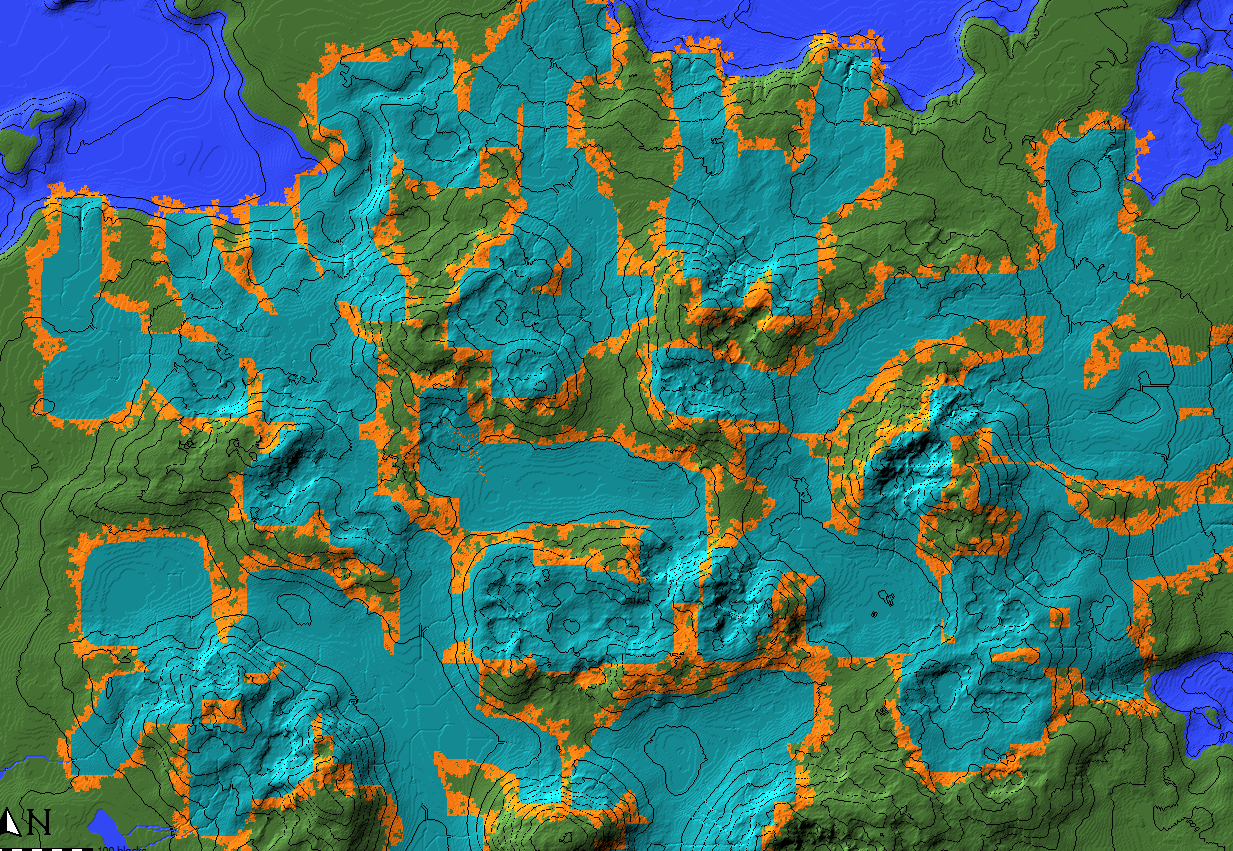
Raise/lower whole sections of terrain with a smooth transition. Great for large river systems or table-mountains
This script will force all cyan-annotated blocks to a specified level and smoothly transition the change into the existing terrain.
Transition radius can be configured.
I used it to paint a river system with annotation and then force it to level 62 to create ocean-level rivers, and i used it to mark out a continent and raise that out of the water with one click.
https://github.com/IR0NSIGHT/ExpandLayer/blob/master/src/ValleyCraft.js
Tag: automation
Navigate
Category
Tag
API automation caves chunk collab custom-object-layer dannypan distant-horizons export github grayscale heightmap import java javascript legacy loot mapsize mca-selector merge new-feature noob ocean optimize ores plugin populate read-only region render river rivers schematics script scripting structures super-flat TODO tutorial vanilla-transition vintage story water worldedit
-
ValleyCraft
Raise/lower whole sections of terrain with a smooth transition. Great for large river systems or table-mountains This script will force all cyan-annotated blocks to a specified level and smoothly transition the change into the existing terrain.Transition radius can be configured. I used it to paint a river system with annotation and then force it to […]
Details
-
Mark edge
A single purpose scriptMark all edges that are yellow and border magenta annotation with red annotation Use case: find out where two specific biomes share a border.Paint biome-A with yellow annotationPaint biome-B with magenta annotationRun scriptreceive red edge https://github.com/IR0NSIGHT/ExpandLayer/blob/master/src/MarkEdges.js
Details
A single purpose script
Mark all edges that are yellow and border magenta annotation with red annotation
Use case: find out where two specific biomes share a border.
Paint biome-A with yellow annotation
Paint biome-B with magenta annotation
Run script
receive red edgehttps://github.com/IR0NSIGHT/ExpandLayer/blob/master/src/MarkEdges.js
-
Levelize
Globally force all cyan-annotated blocks to a specific height Great for flattening large areas with better precision than using the flatten brush. https://github.com/IR0NSIGHT/ExpandLayer/blob/master/src/Levelize.js
Details
Globally force all cyan-annotated blocks to a specific height
Great for flattening large areas with better precision than using the flatten brush.
https://github.com/IR0NSIGHT/ExpandLayer/blob/master/src/Levelize.js -
Clear By Chance
Remove x percent of all cyan-annotated blocks
Details
Remove x percent of all cyan-annotated blocks to achieve a global-operation-spraypaint-effect
https://github.com/IR0NSIGHT/ExpandLayer/blob/master/src/clearByChance.js -
Expand Layer
Expand cyan annotations layer by layer
Details
expand the cyan annotations layer by x amount of blocks in all directions choose the chance for each new layer to stop generating
The script will generate layer by layer, like an onion, inside out
downloads: https://github.com/IR0NSIGHT/ExpandLayer/releases
github: https://github.com/IR0NSIGHT/ExpandLayer

- Top left: 20 iterations, 1 chance
- Top right: 1 iterations, 1 chance
- Bottom left: 20 iterations, 0.7 chance
- Bottom right: 20 iterations, 0.5 chance
-
How do I use .js scripts in WorldPainter?
WorldPainter allows executing JavaScript files (.js) in its own scripting API. Warning: Once started, there is no way to interrupt a script without crashing worldpainter. Save your work before running a script.
Details
WorldPainter allows executing JavaScript files (
.js) in its own scripting API.- Download the script from GitHub or <#1095425730206257266>.
- In WorldPainter, top-center click
Tools -> Run Script. - Select the path to your downloaded script in the file tab.
- Set the parameters in the window for the script.
- Run the script.
- Close the window. Undo/Redo works for scripts too.
Warning: Once started, there is no way to interrupt a script without crashing worldpainter. Save your work before running a script.
-
How can I create WorldPainter scripts?
WorldPainter has a scripting API for JavaScript (and Java) that is documented here: WorldPainter Scripting API.
Details
WorldPainter has a scripting API for JavaScript (and Java) that is documented here: WorldPainter Scripting API.
-
How do I make rivers?
There are a few ways to make realistic-looking rivers and streams in WorldPainter. There are multiple automated approaches: Make sure to read the guides provided for all scripts. Alternatively, you can manually make a custom ground cover layer or download one here to draw rivers yourself. If you select this method you will need to […]
Details
There are a few ways to make realistic-looking rivers and streams in WorldPainter.
There are multiple automated approaches:
- The paid River Script, that uses realistic pathfinding to carve out a flowing river. A very good solution for medium-sized rivers that flow downhill. Rivers will alter terrain to find a path.
- The free Puddler script will also add small streams, rivers, and ponds to your maps. An easy way for small streams flowing downhill while creating ponds. Not suited for very steep terrain.
- The free ValleyCraft script, which helps with carving out flat rivers and smoothly blending them into existing terrain. Works for all river sizes but requires manually marking the rivers and does not allow sloped rivers. Good for very large scale and ocean-level/shippable rivers.
Make sure to read the guides provided for all scripts.
Alternatively, you can manually make a custom ground cover layer or download one here to draw rivers yourself. If you select this method you will need to smooth out the terrain and ensure it always flows down manually.

