Category: Knowledge

Navigate

  • ,

    How do I use .js scripts in WorldPainter?

    WorldPainter allows executing JavaScript files (.js) in its own scripting API. Warning: Once started, there is no way to interrupt a script without crashing worldpainter. Save your work before running a script.
    Details

    WorldPainter allows executing JavaScript files (.js) in its own scripting API.

    1. Download the script from GitHub or <#1095425730206257266>.
    2. In WorldPainter, top-center click Tools -> Run Script.
    3. Select the path to your downloaded script in the file tab.
    4. Set the parameters in the window for the script.
    5. Run the script.
    6. Close the window. Undo/Redo works for scripts too.

    Warning: Once started, there is no way to interrupt a script without crashing worldpainter. Save your work before running a script.
  • How do I download things from GitHub?

    3 easy ways to get what you want from github without being a sweaty programmer.

    Details
    Note: Github is primarily made for developers to share code with eachother. Distributing ready-to-use-programs to end users is an afterthought and is not intuitive for the public.

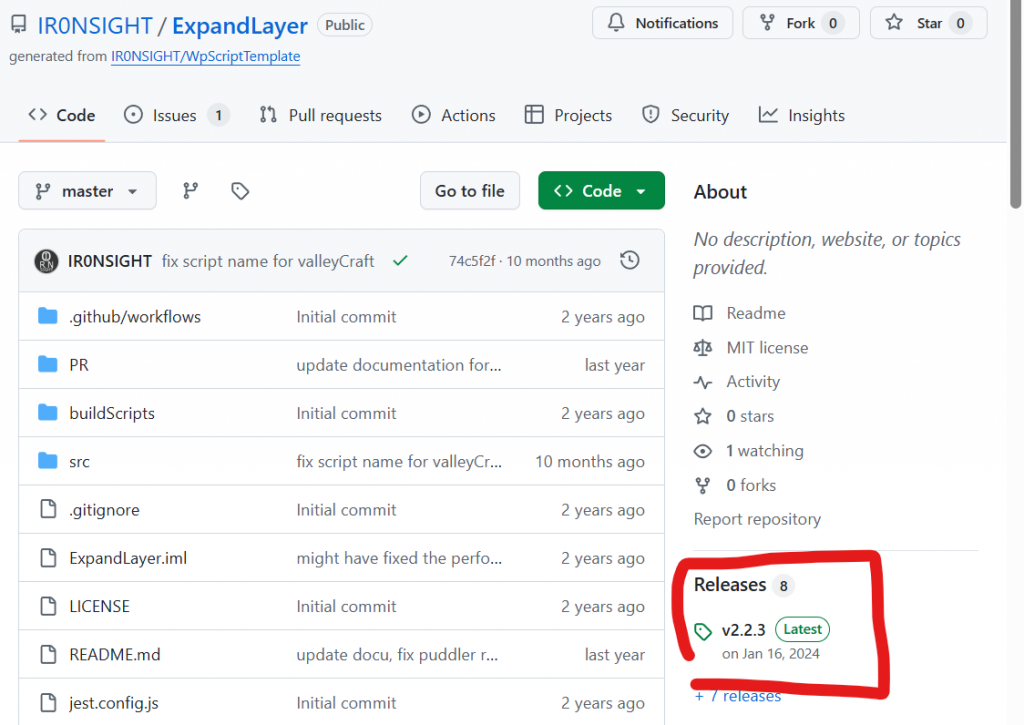
    Look for the release page on the right window; good chance there are .exe files or similar bundled downloads available.

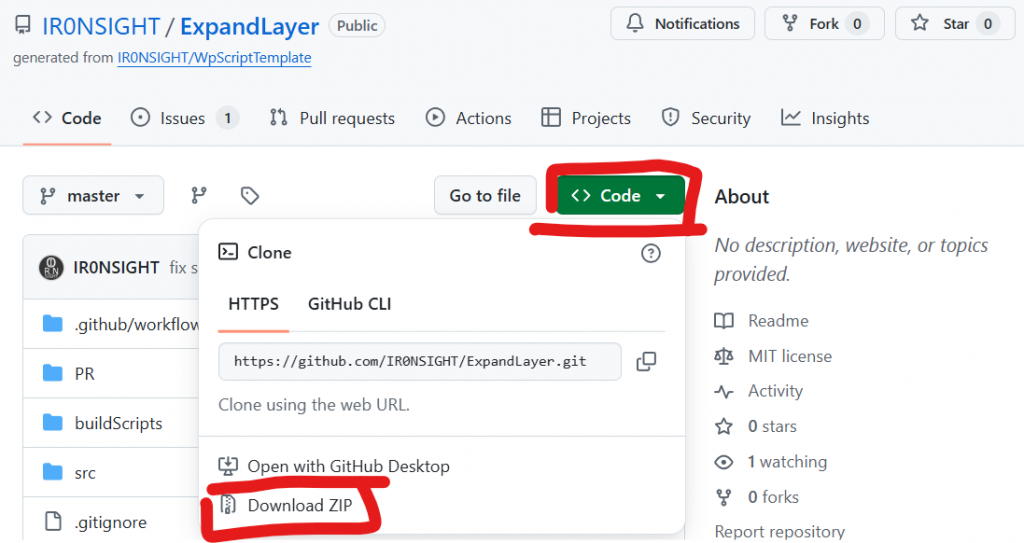
    If no releases exist and you just want to get the files you see in the source overview, use the green “Code” button and download as zip. This will usually not work if you are downloading a program that needs to be executed.

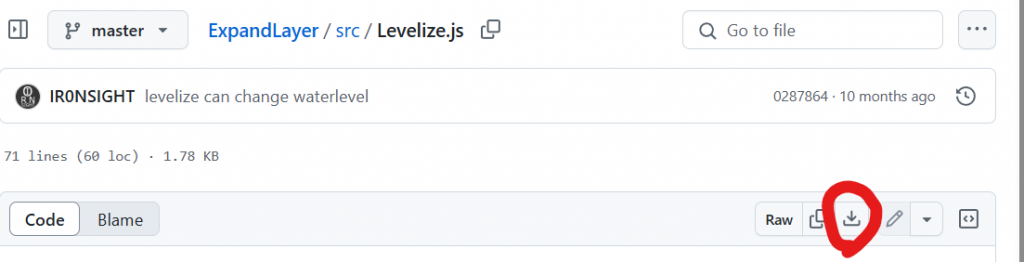
    If you only want to download one single file, use the “download raw file” button. This also only works for programs that dont need to be compiled. If in doubt, contact the developer.

  • What is the Master Dimension?

    A master dimension is an experimental feature that expands a map 16 times in each direction. It creates large, mostly featureless areas where you can add specific places for fine detailing. Due to the unexpected nature and size of maps made with it, you’re best off not using the feature.

    Details

    A master dimension is an experimental feature that expands a map 16 times in each direction. It creates large, mostly featureless areas where you can add specific places for fine detailing. Due to the unexpected nature and size of maps made with it, you’re best off not using the feature.

  • Why aren’t my schematics made with WorldEdit working?

    If you’re using WorldEdit version 7.3 or higher, when saving schematics use this format://schem save [filename] sponge.2.This is because WorldEdit 7.3+ uses the latest .schem format, which WorldPainter does not yet support.

    Details

    If you’re using WorldEdit version 7.3 or higher, when saving schematics use this format:
    //schem save [filename] sponge.2.
    This is because WorldEdit 7.3+ uses the latest .schem format, which WorldPainter does not yet support.

  • How can I create WorldPainter scripts?

    WorldPainter has a scripting API for JavaScript (and Java) that is documented here: WorldPainter Scripting API.

    Details

    WorldPainter has a scripting API for JavaScript (and Java) that is documented here: WorldPainter Scripting API.

  • ,

    How do I add custom objects?

    This guide will explain how to add custom objects and what the adjustable settings are.

    Details

    This guide will explain how to add custom objects and what the adjustable settings are.

  • ,

    How do I optimize my map?

    To optimize your world, open Minecraft and search for your map in the save file list. Press “Edit World” and then “Optimize World.” Minecraft will update your chunks to the version of Minecraft you are currently using.

    Details

    To optimize your world, open Minecraft and search for your map in the save file list. Press “Edit World” and then “Optimize World.” Minecraft will update your chunks to the version of Minecraft you are currently using.

  • How do I add water properly to my map?

    Details
    1. For adding oceans, lower your terrain until it goes below groundwater. You can also use the flood tool to raise the water level or create lakes.
    2. Do not use “water” as a terrain, like stone or grass. It’s never what you need.
    3. For large rivers, lower terrain as you would for oceans. We call those “ocean-level rivers”; they have the advantage of being easy to make, and players can navigate them with vanilla ships.
    4. For rivers that go from high-to-low or that are very small (creeks), refer to FAQ “Rivers” (Advanced technique).
    5. Set your project’s ocean level carefully. There is no way to change it afterward.
    6. Use level 62 to be compatible with vanilla chunks surrounding your map (no border).
    7. Force your map border to level 31 (?) to be compatible with the ocean floor of vanilla chunks (TODO verify number).
  • How can I extend my render distance beyond normal limits?

    To extend your render distance far beyond the usual limits, you can use Distant Horizons, which creates LODs beyond your render distance to fake extreme distances of 512 and beyond, depending on your PC. DH also has some support for Iris on their Discord channel. Alternatively, you can use Bobby, which creates a cache of […]

    Details

    To extend your render distance far beyond the usual limits, you can use Distant Horizons, which creates LODs beyond your render distance to fake extreme distances of 512 and beyond, depending on your PC. DH also has some support for Iris on their Discord channel. Alternatively, you can use Bobby, which creates a cache of your chunks to extend your render distance. More accurate but more demanding. There is also Voxy, which creates accurate LODs based on areas you’ve already generated/visited, but is still in alpha and lacks a world generator like Distant Horizons.

  • How do I make rivers?

    There are a few ways to make realistic-looking rivers and streams in WorldPainter. There are multiple automated approaches: Make sure to read the guides provided for all scripts. Alternatively, you can manually make a custom ground cover layer or download one here to draw rivers yourself. If you select this method you will need to […]

    Details

    There are a few ways to make realistic-looking rivers and streams in WorldPainter.

    There are multiple automated approaches:

    1. The paid River Script, that uses realistic pathfinding to carve out a flowing river. A very good solution for medium-sized rivers that flow downhill. Rivers will alter terrain to find a path.
    2. The free Puddler script will also add small streams, rivers, and ponds to your maps. An easy way for small streams flowing downhill while creating ponds. Not suited for very steep terrain.
    3. The free ValleyCraft script, which helps with carving out flat rivers and smoothly blending them into existing terrain. Works for all river sizes but requires manually marking the rivers and does not allow sloped rivers. Good for very large scale and ocean-level/shippable rivers.

    Make sure to read the guides provided for all scripts.

    Alternatively, you can manually make a custom ground cover layer or download one here to draw rivers yourself. If you select this method you will need to smooth out the terrain and ensure it always flows down manually.