plugin github page
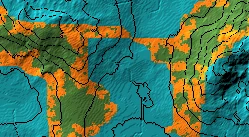
This plugin allows you to automatically select the edge of a layer and apply a gradient to it, growing outwards or inwards.
NOTE: if you are looking for the fractal expandlayer script go here=> github expandlayer script
- go to the release page
- select the top most release
- download the Expand-layer-???.jar file
- open worldpainter
- go to top bar -> tools -> open plugins folder
- place the downloaded jar file in the folder
- restart worldpainter
- The “Select Edge Operation” can be found in the tools section of worldpainter. Select the 2 blue circles.
- Specify your wanted settings in the tool-settings section. You will probably need to adjust your layout to see all of the settings tab.
- Press “run” in the settings tab to execute the plugin
- The plugin will find all blocks that are the input layer, grow in the specified direction, apply the gradient and the paint the result as the output layer in the map
- If you press gradient: edit, a graphical editor for the applied gradient will appear.
- It shows a preview of the output, where left is the beginning of your input layer and the gradient grows to the right.
- The gradient is not to scale and will be rescaled by the operation using the selected “width” parameter.
Q: I dont see the “run” or “help” button A: Your tool settings window is to small. Drag it wider
Q: If i click run, nothing on my map happens A: You need to have blocks of your selected input layer painted on the map, otherwise nothing can and will happen.

Leave a Reply